Interactive Live Python & REPL
Last changes: Documentation changelog
FullMag supports interactive live Python control (fullmag.live) in addition to stage-first
batch scripts. Calling fm.connect() attaches an interactive Python REPL, script, or Jupyter
notebook directly to a running Docker DEV group so every model edit commits immediately and
fm.relax(), fm.run(), and fm.run_until(...) execute as live runtime commands while the
Control Room visualizes fields and scalars in real time.
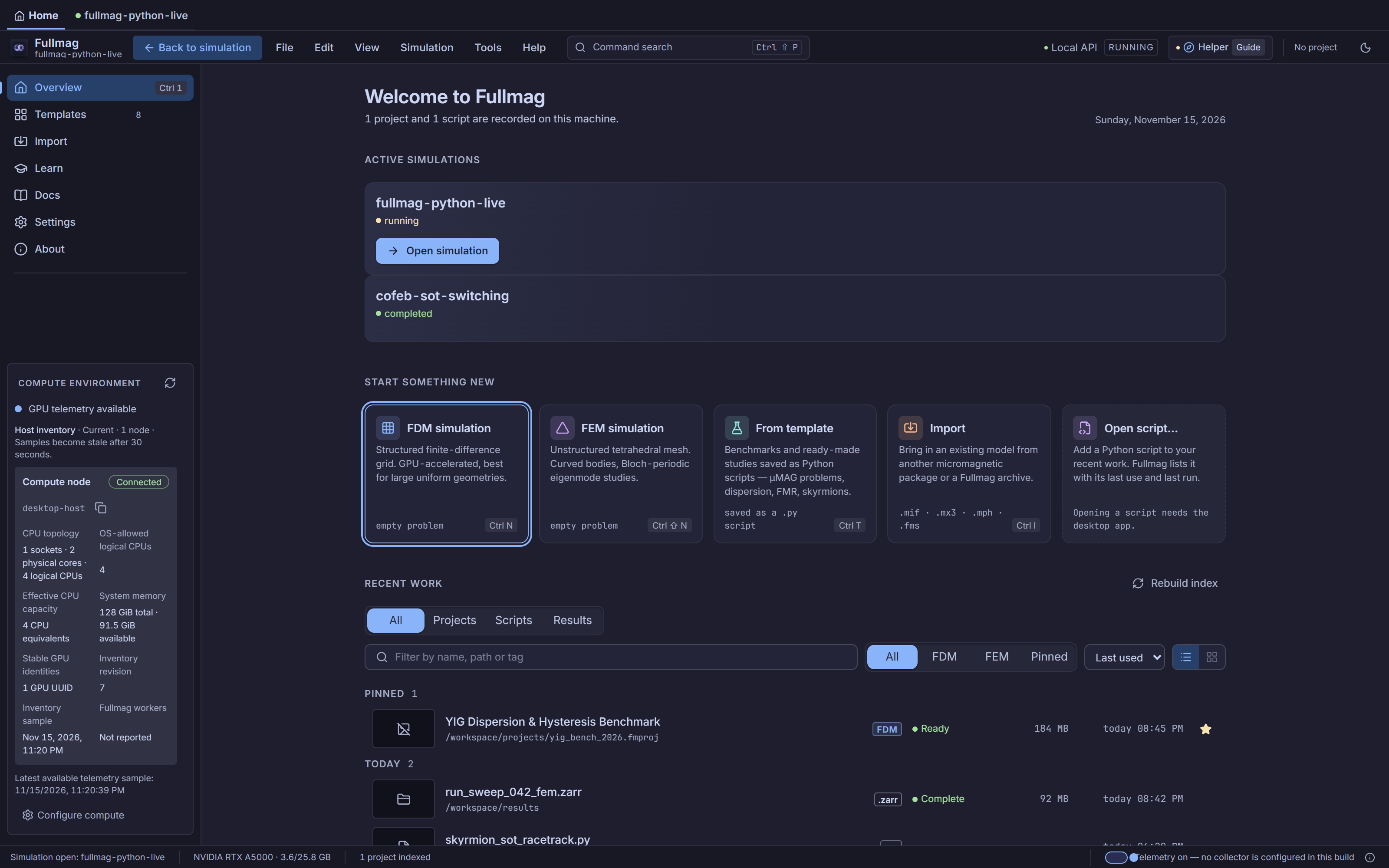
The Control Room Start Screen detects sessions created by fm.connect() and surfaces them under Active simulations for one-click visual inspection.
Live REPL versus stage-first batch scripts
Use the authoring style that matches how you are working:
Workflow |
Entry point |
When to use |
Execution path |
|---|---|---|---|
Interactive live Python |
|
Explorative prototyping, Jupyter notebooks, iterative REPL field sweeps, closing loops on live observables |
Executes directly against the attached server session over HTTP + WebSocket |
Stage-first batch script |
|
Reproducible studies, multi-stage pipelines, automated verification, headless container runs |
Lowers to |
Both modes share the same physical parameter units (SI), discretization contracts, and
ProblemIR validation rules. Calling fm.export_script() inside a live session retrieves a
canonical, self-contained Python script representing the active model on the server.
Connecting to a running FullMag instance
Install the pure-Python client (pip install fullmag or pip install "fullmag[jupyter]"), ensure
a Docker DEV group is running (for example via just docker-dev "$PWD" 3197), and attach from any
terminal, IDE interactive window, or notebook:
>>> import fullmag as fm
>>> session = fm.connect("http://127.0.0.1:3197")  # or omit url to read $FULLMAG_URL
>>> fm.engine("fdm")
>>> fm.device("cpu", precision="double")
>>> fm.cell(5e-9, 5e-9, 10e-9)
>>> fm.solver(fix_dt=1e-13)
>>> film = fm.geometry(fm.Box(size=(200e-9, 100e-9, 10e-9), name="film"), name="film")
>>> film.Ms = 800e3
>>> film.Aex = 13e-12
>>> film.alpha = 0.5
>>> film.m = fm.texture.uniform(1, 1, 0)
Key connection parameters:
fm.connect(url=None, *, new_session=False, backend=None, token=None, timeout=30.0, retry_budget_s=60.0, command_timeout=None, source_path=None, events=True): attaches to the frontend origin ($FULLMAG_URL, defaulting tohttp://127.0.0.1:3197, with optional bearer auth from$FULLMAG_TOKEN). Passnew_session=Trueto start a new server session rather than attaching to the active one, and optionally passbackend="fdm"or"fem"when creating a fresh session.Client presence heartbeats:
LiveSessionruns a background heartbeat thread calling the session heartbeat endpoint every \(10\ \mathrm{s}\) (identifying the client viasource_path.nameor"python-live"). This keeps the live session active and synchronized with the Control Room Start Screen (Active simulations).fm.disconnect(): cleanly stops the WebSocket listener and presence heartbeat thread without stopping the backend container or discarding the server session.Live-hook conflicts and unsupported operations: Operations that do not apply to interactive command execution—such as
relax_stage,run_stage, eigenmode or frequency-response studies, or local file writers (save,save_response,snapshot)—raisefm.LiveModeError. Concurrent conflicting edits between the UI and Python raiseStaleRevisionErrorinstead of silently overwriting changes.
Transactions, synchronization, and script export
Outside a transaction, each top-level DSL call (fm.b_ext(...), material assignments, geometry
additions) automatically commits an incremental scene update. When applying related parameter edits
together—such as updating anisotropy and bias field simultaneously—wrap them in fm.transaction()
so the server commits a single atomic revision:
>>> with fm.transaction():
...     film.alpha = 0.02
...     fm.b_ext(0.05, 0.0, 0.0)
>>> rev = fm.sync()  # returns the latest committed server scene revision
>>> canonical_py = fm.export_script()  # retrieve canonical editable Python script
fm.sync(reconcile=False): ensures all pending local model state is flushed to the server; passreconcile=Trueto synchronize local authoring proxies with changes made in the Control Room.fm.export_script(): downloads the canonical script serialized from the current server model so an interactive session can be saved as a reproducible batch script.fm.execution_context()/fm.ExecutionContext()andfm.reset(): isolate multiple flat-DSL documents inside the same Python process and reset flat authoring state between independent runs.
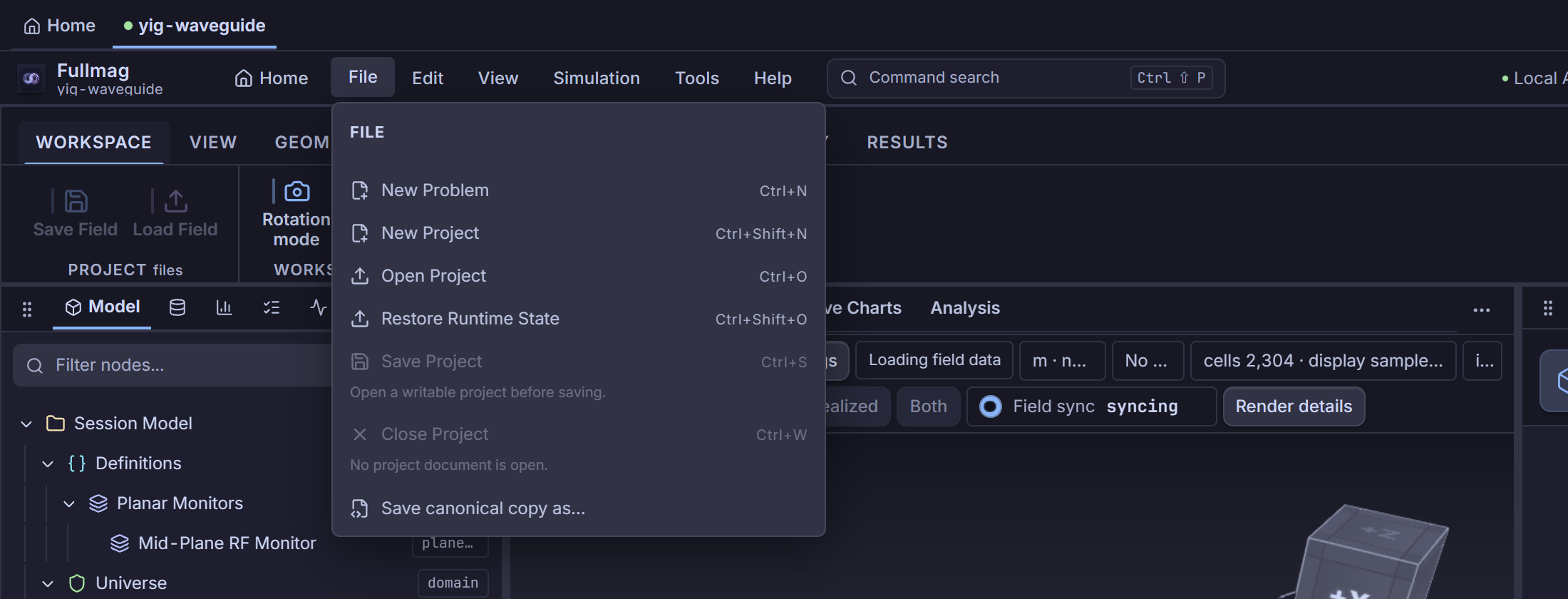
Canonical Python script export via File -> Save canonical copy as… in the Control Room, complementing fm.export_script() in interactive fullmag.live sessions.
Relaxing, continuing magnetization, and predicate loops
Sequential commands preserve magnetization continuity: fm.run() and fm.relax() inherit the
exact final magnetization \(\mathbf{m}\) of the previous command whenever the discretization has not
changed. In the Control Room, opening any stage in the Study inspector (Initial magnetization
selector) lets you inspect saved stage results, preview prior magnetization states, and re-run a
stage from a chosen initial state on the shared session.
>>> res1 = fm.relax(dt=1e-13, tolT=1e-4, max_steps=1_000)
>>> res1.status
'completed'
>>> fm.b_ext(-0.04, 0.01, 0.0)
>>> # Step dynamically in 10 ps chunks until mx reverses sign (up to 1 ns)
>>> last = fm.run_until(
...     lambda sess: sess.table("scalars", columns=("mx",)).column("mx")[-1] < 0.0,
...     chunk_time=10e-12,
...     max_time=1.0e-9,
... )
Available execution and transport helpers:
fm.relax(...): runs overdamped relaxation (algorithm="llg_overdamped"or lane-supported minimizers, withtol,tolA,tolT,max_steps,dt,max_relaxation_time_s,max_pseudotime_s,max_physical_time_s,relax_alpha,solver,max_error,dt_min,dt_max,field_refresh,stop).fm.run(until)andfm.run_until(predicate, *, chunk_time, max_time=None, max_chunks=None)/fm.run_while(condition, *, chunk_time, max_time=None, max_steps=None, relax=False): advance LLG time integration for a fixed physical duration (s) or until a Python condition triggers.fm.pause(),fm.paused(),fm.resume(),fm.stop(),fm.skip(): runtime transport controls declared on the session. Note the server capability boundary: in Docker accepted mode, mid-commandpause,paused(), andskipare explicitly rejected by the server (UnsupportedCapabilityError); apply parameter edits between commands or betweenrun_untilchunks instead.
Reading binary fields (FMVP) and scalar tables (FMTB)
Live readback fetches binary vectors and tables directly over the data plane with NumPy (never .numpy()):
>>> field_vec = fm.field("m")  # returns FieldVector or None
>>> m = field_vec.to_numpy()  # NumPy array of shape (point_count, 3)
>>> grid = field_vec.as_grid()  # 4D structured grid array for FDM (nx, ny, nz, 3)
>>> scalars = fm.table("scalars", columns=("t", "mx", "my", "mz"))
>>> t = scalars.column("t")  # 1D NumPy vector in seconds
>>> df = scalars.to_pandas()  # optional pandas DataFrame conversion
fm.field(quantity_id, **query)returns aFieldVectorwith.point_count,.to_numpy(),.as_grid()(for structured FDM grids), and.as_complex()(for complex spectral/response fields). Passscope_kind="airbox"on FEM sessions when querying demagnetization fields over the airbox domain.fm.table(table_id, *, columns=None, **query)returns aTableRowsobject exposing.to_numpy(),.column(name), and.to_pandas().
Live events, Jupyter monitoring, and multi-group sweeps
Subscribe to realtime WebSocket events ("scalar.sample", "resource.batch_changed", "hello",
"resync.required", or "*"), plot streaming observables inside a Jupyter notebook, or fan out a
parameter sweep across multiple independent Docker DEV groups simultaneously:
>>> sub = fm.on("scalar.sample", lambda ev: print(ev.payload))
>>> # Inside a Jupyter notebook (requires fullmag[jupyter]):
>>> from fullmag.live.jupyter import monitor
>>> mon = monitor(("mx", "my", "mz"), min_interval_s=0.25)
>>> fm.run(200e-12)
>>> mon.stop()
>>> sub.cancel()
>>> fm.disconnect()
For parallel parameter studies across separate running DEV groups (for example ports 3197 and
3199), use fm.sweep(...):
>>> def evaluate_field(session, *, hx):
...     session.sync()
...     fm.b_ext(hx, 0.0, 0.0)
...     fm.relax(dt=1e-13, tolT=1e-4, max_steps=1_000)
...     return float(fm.field("m").to_numpy()[:, 0].mean())
>>>
>>> results = fm.sweep(
...     evaluate_field,
...     groups=["http://127.0.0.1:3197", "http://127.0.0.1:3199"],
...     hx=[0.01, 0.02, 0.03, 0.04],
... )
More runnable live scripts live in the repository under examples/live/ (01_fdm_relax_read_m.py
through 05_jupyter_monitor.py).
Complete stage-first batch counterpart
When capturing an interactive workflow into a reproducible headless study, convert the commands into
an explicit fm.study(...) with study.stages.add_*:
# %% Reproducible stage-first counterpart
import fullmag as fm

nm = 1.0e-9
study = fm.study("interactive_python_counterpart")
study.engine("fdm")
study.device("cpu", precision="double")
study.mode("strict")
study.cell(5 * nm, 5 * nm, 10 * nm)
study.solver(fix_dt=1e-13)

film = study.geometry(
    fm.Box(size=(200 * nm, 100 * nm, 10 * nm), name="film"),
    name="film",
)
film.Ms = 800.0e3
film.Aex = 13.0e-12
film.alpha = 0.02
film.m = fm.texture.uniform(1, 1, 0)

study.exchange()
study.demag()
study.b_ext(0.05, 0.0, 0.0)

study.stages.add_relax(
    stage_id="relax",
    algorithm="llg_overdamped",
    dt=1e-13,
    tolT=1e-4,
    max_steps=1_000,
)
study.tableautosave(
    50e-12,
    quantities=["step", "t", "mx", "my", "mz", "E_total"],
)
study.stages.add_run(
    stage_id="dynamics",
    until=1.0e-9,
)
Control Room crosswalk
Live sessions created by fm.connect() appear in Start Screen -> Active simulations, and
opening them in the Control Room displays the shared model in Model Explorer, 3D Viewport,
Inspector, and Live Charts. See Start Screen & Workspace Hub,
Study Authoring, Stages & Interactive Re-Execution, and Control Room capability register for exact
panel coverage.
Python/API crosswalk
Exact live transport signatures, event schemas, error hierarchy (LiveModeError,
StaleRevisionError, UnsupportedCapabilityError), and HTTP/WebSocket protocol details are
maintained in Live Session.
Physics, limitations, and bibliography
Live transport adds no physical equations; governing physics, units, and discretization assumptions are inherited from the active FDM/FEM backend and Relaxation Study, RelaxStop, and add_relax Stage Contract / TimeEvolution Study and add_time Stage Contract.
Source-code index
packages/fullmag-py/src/fullmag/live/__init__.py—connect,disconnect,sync,transaction,paused,pause,resume,stop,skip,field,table,on,run_until,sweep,export_script: public live client entry points.packages/fullmag-py/src/fullmag/live/_session.py—LiveSession: HTTP/WebSocket runtime bridge, 10 s presence heartbeat (sessions.heartbeat), chunked predicate execution, and script export.packages/fullmag-py/src/fullmag/live/sweep.py—sweep,SweepResult: parallel multi-group execution across independent DEV group URLs.packages/fullmag-py/src/fullmag/live/jupyter.py—monitor,ScalarMonitor: live Jupyter scalar monitor.packages/fullmag-py/src/fullmag/client/fmvp.py—FieldVector: binary field decoding with.to_numpy(),.as_grid(), and.as_complex().packages/fullmag-py/src/fullmag/client/fmtb.py—TableRows: binary table decoding with.to_numpy(),.column(), and.to_pandas().