Ribbon, Multi-Instance Tabs & Semantic Explorer
Last changes: Documentation changelog
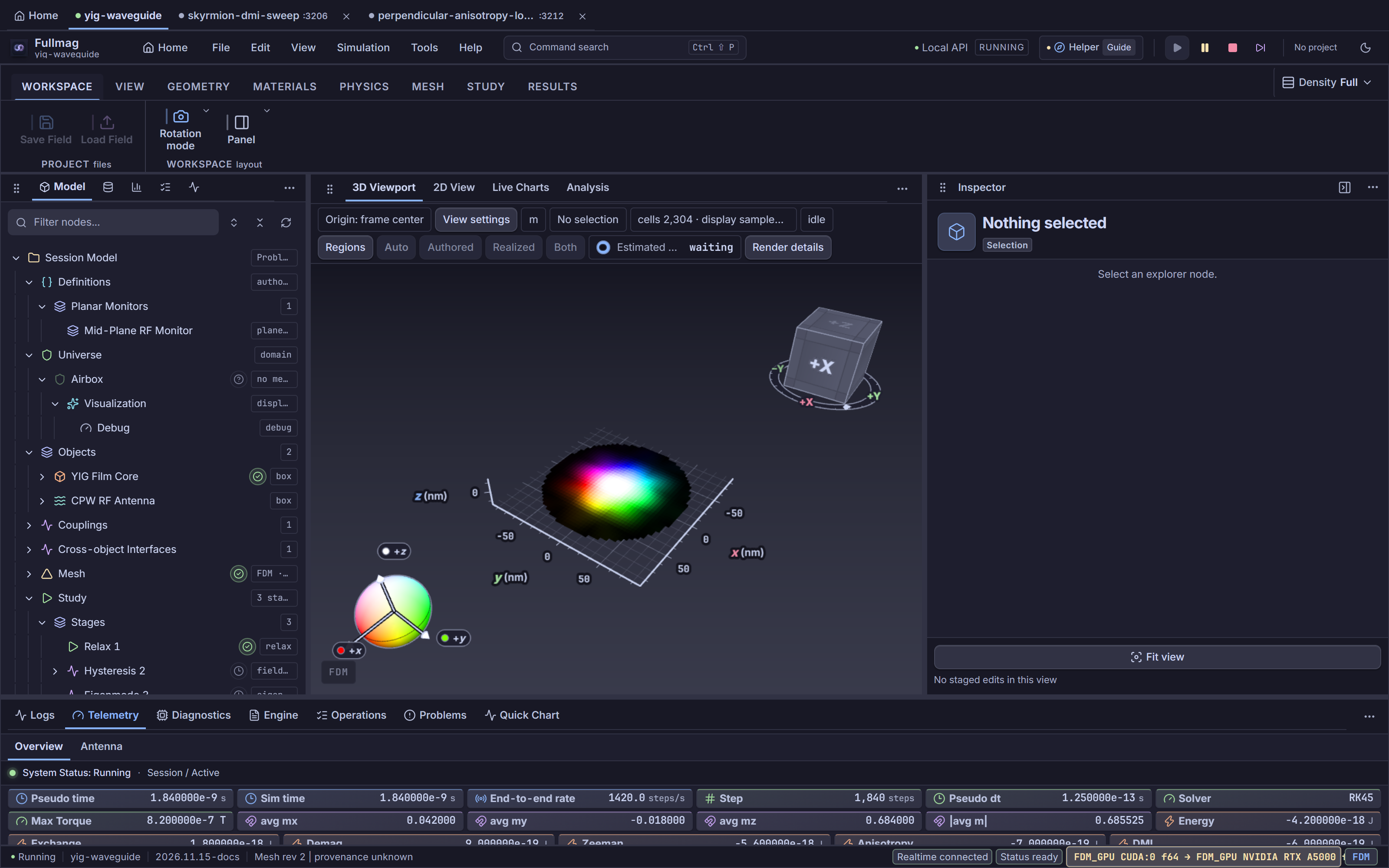
The Control Room shell organizes global navigation and problem construction around four persistent
chrome regions: the Application Menu Bar (AppMenuBar), the Multi-Instance Session Tab
Strip (InstanceTabStrip), the Contextual Ribbon (RibbonModule), the Semantic Explorer
(ExplorerModule), and the Footer Dock & Status Bar (FooterModule, StatusBarModule).
Multi-Instance Session Tabs and URL Routing
InstanceTabStrip (apps/control-room/src/kernel/layout/InstanceTabStrip.tsx) and tabRoutes.ts
manage navigation between Home, the local session, and sibling Control Room instances running on
other local ports:
Route pattern |
Meaning |
Tab behavior |
|---|---|---|
|
Start Screen workspace hub |
Opens Home overlay without stopping the active local session |
|
Active simulation workspace ( |
Displays the active session with a live status dot ( |
|
Remote/sibling instance scoped beneath a session route |
Opens or focuses an instance tab backed by |
|
Direct sibling instance tab ( |
Keyboard-closable ( |
Sibling instance tabs render in addition to Home and the host’s current session so operators can monitor parallel runs (e.g., separate Docker Compose development groups) from one browser window.
Application Menu Bar, Run Controls, and Command Palette
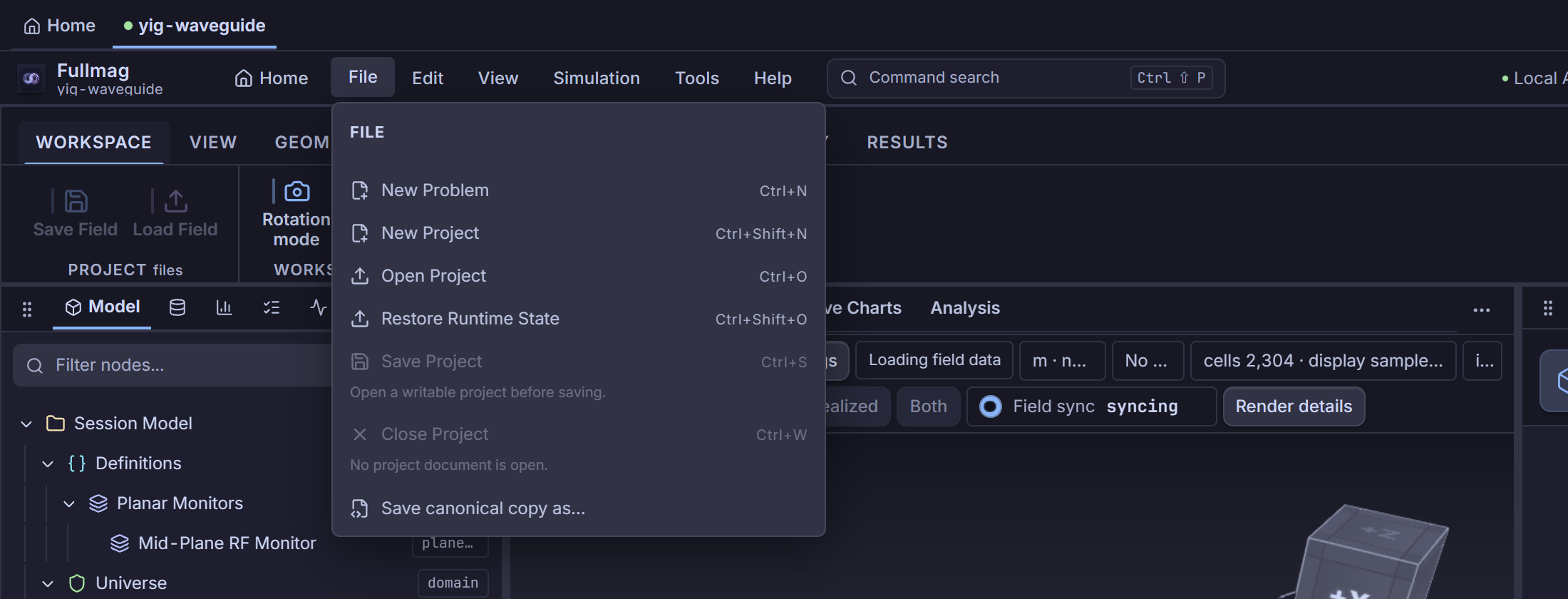
AppMenuBar (apps/control-room/src/kernel/layout/AppMenuBar.tsx) provides a WAI-ARIA menubar
(File, Edit, View, Simulation, Tools, Help), quick-action buttons (Save Project,
Apply Inspector, Undo, Redo), header run transport (Compute Study, Pause, Stop, Skip),
a Catppuccin theme switcher (ThemeSwitcher toggling Mocha Dark and Latte Light),
ProjectDocumentStatus, ReadinessHelperHeaderControl, and modal utility dialogs (Material Library,
Data Preview, Communication, Diagnostic Recorder, Visualization Registry).
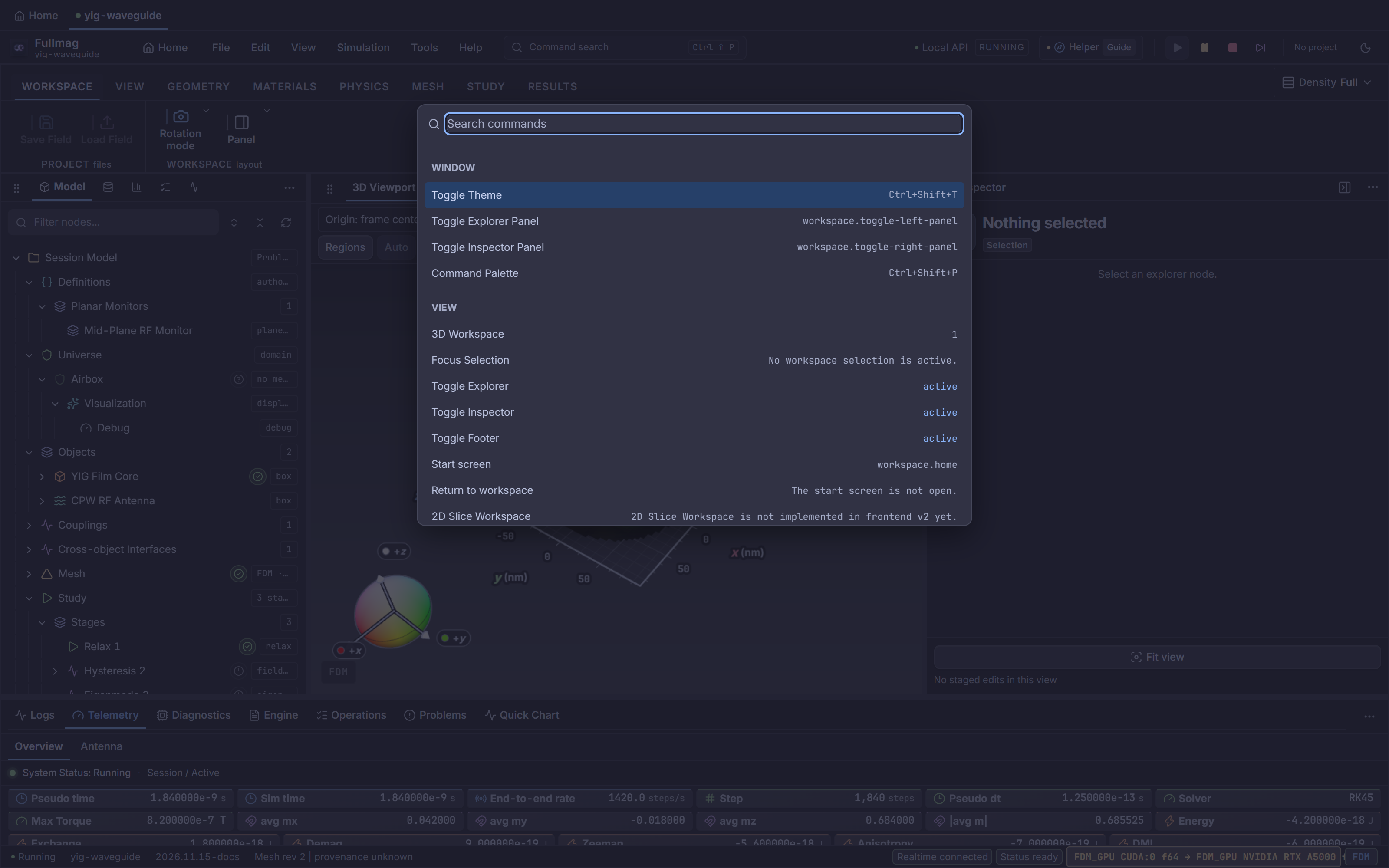
The Command Palette (CommandPaletteModule) opens via Command search (Ctrl+Shift+P, or
Edit -> Command Palette), filtering registered non-input CommandContribution entries by ID,
title, group, category, and shortcut, and displaying live enabled/active status plus inline
Detail inspection when available.
Contextual Ribbon Architecture
RIBBON_TABS (apps/control-room/src/modules/ribbon/ribbonTypes.ts) defines ten canonical tab IDs
plus one contextual analysis tab (ANALYSIS_CONTEXT_TAB_ID = "analysis-context"). At render time,
stripRibbonPlaceholders (ribbonContributions.tsx) removes placeholder entries flagged with
preview: true, and ribbonTabHasContent displays only tabs that carry live executable commands.
As a result, the live tab strip currently renders eight core tabs—Workspace (home), View,
Geometry, Materials, Physics, Mesh, Study, Results—plus the contextual
Analysis tab when active, while Definitions (definitions) and Automation
(automation) remain defined in the tab model but hidden from the strip until their commands leave
preview.
Workspace, View, and Geometry
Workspace (
home):Project(Save Field,Load Field) andWorkspace(Rotation mode: Free camera / Object orbit;Panelvisibility checkboxes for Explorer, Inspector, Bottom dock).View (
view): Global 3D display quality profiles (Interactive Lite,Interactive,Balanced,Figure,Capture), Capture current frame export (including viewport/transparent background and super-sampled scale),Surface,Texture(Solid,HSL orientation, component X/Y/Z, Magnitude \(|m|\), colormap),Quantity,Vectorsdensity/component/domain/color,Airbox,Mesh View+ 3D trim (X,Y,Z), orientation widgets (3D Box,HSL Sphere), 2D slice monitor controls (Monitor,Open, 16 planar toolbar actions,Export,Data), selected-object display overrides, manipulation (Control,Inspect,Gizmo), view snapshot export, andDisplay(Mode,Camera settings,Ortho,Panels,Frame,Topography).Geometry (
geometry):Createshapes (Box,Cylinder,Sphere,Microstrip,CPW,Thin Film),Transform(MoveshortcutW; rigidRotate/Scaleremain disabled withPROBLEM_IR_03_RIGID_TRANSFORM_REASON),Lifecycle(Build Geometry,Apply Draft,Build Mesh[hidden on FDM sessions],Validate), and camera focus (Focus SelectedF,Frame AllShift+F).

Materials and Mesh
Materials (
materials): Initial magnetization presets (Uniform,Random,Vortex;Bloch SkyandNéel Skyare presentlypreview-gated). Core scalar material and anisotropy parameters are authored in the Semantic Inspector (ObjectMaterialPanel).Mesh (
mesh): Discretization-awareBuildgroup (Build Gridin FDM sessions;Buildfor selected object,Build Allshared domain, andStatisticsin FEM sessions),Element Size,Quality, andMesh Viewtoggles (Inspector,3D View,Pipeline).

Physics
Physics (
physics): Dynamically populated frominteractionSpecsForDiscretizationand active lane capabilities (resolveActiveLaneOperation), offering Add Physics (includingSpin Transport / SHE,Spin Interface, and active micromagnetic interactions), Global Physics (includingField Drive), and Frozen Spins.

Study, Results, Contextual Analysis, and Python Canonical Export
Study (
study):Overview/Stagesnavigation, stage creation (Relax,Field Drive,Table,Autosave,FFT,Run,Hysteresis,Eigenmodes,Frequency,Save State),Remove, and execution controls (Compute Fields,Compute Energies,Prepare,Build + Study,Cancel Build + Study,ComputeF5,Pause,Resume,Save Checkpoint,Restore,Restore Runtime State,Export State,Discard,Stop,Skip stage).Results (
results): SpatialQuantityswitchers (M,H_eff,H_demag,H_ex,H_anis,Torque,Energy, plus dynamicModetoggle when inspecting an eigenmode or response overlay) andExport(VTK,Save State).Analysis Contextual Tab (
analysis-context): SurfacesChart,3D field, andChart + 3Dview-mode switches alongsideStop animation/Leave mode viewwhen a frequency-domain mode or response field is active.Python Script & Canonical Export: While the dedicated
Automation(automation) ribbon tab stays hidden while itsSync Scriptplaceholder ispreview: true, File -> Save canonical copy as… (workspace.export-python) inAppMenuBarexports the current model as an editable Python script, and live Python sessions integrate continuously over HTTP/WebSocket.

Five-Tab Semantic Explorer
ExplorerModule (apps/control-room/src/modules/explorer/ExplorerModule.tsx) and ExplorerTabBar
(ExplorerTabBar.tsx) organize project entities across five tabs on the left dock:
1. Model Tab
The Model tree (ModelTree) mirrors the canonical semantic hierarchy: study root, global runtime,
Universe / Airbox, geometry Objects (with nested Geometry, Material, Physics,
Magnetization, Mesh, Boundary Faces, Regions, and per-object Frozen Spins / Transport /
Antennas), global Couplings, Planar Monitors, and the ordered Stages pipeline. Selecting
any node routes the right-hand Semantic Inspector to that resource owner.
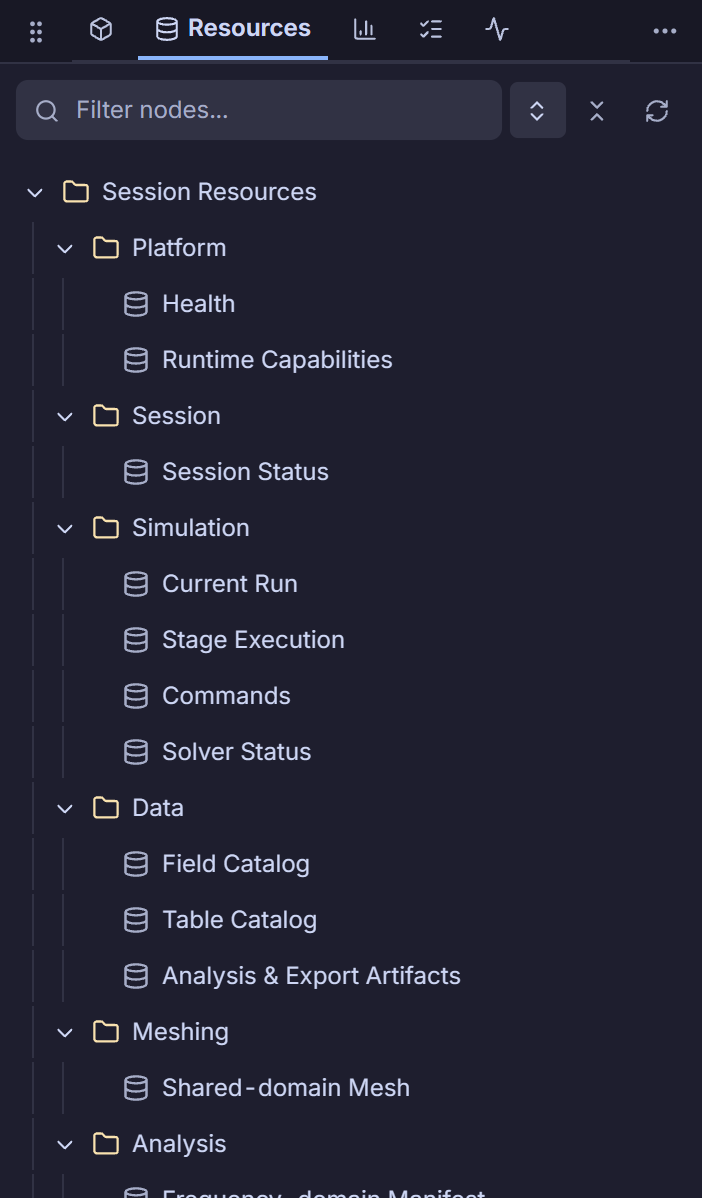
2. Resources Tab
The Resources tab inspects backing session assets, active material definitions, shared-domain
mesh manifests, field/quantity catalogs, and binary resource endpoints without flattening them into
modeling objects.
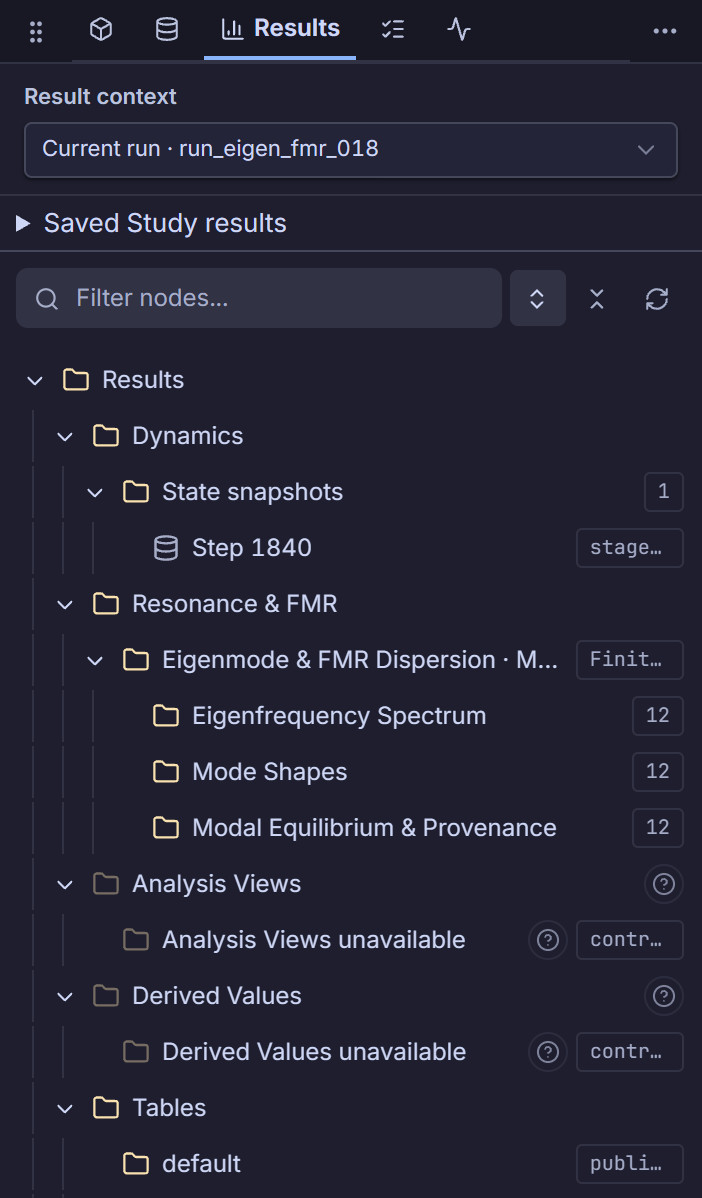
3. Results Tab
The Results tab (ResultsNavigatorModule) indexes live and materialized outputs—including time
tables, hysteresis points, eigenmode dispersion branches, FMR frequency sweeps, and saved
SolutionSet revisions—allowing direct selection into 2D charts, 3D spatial mode overlays, and
saved playback.
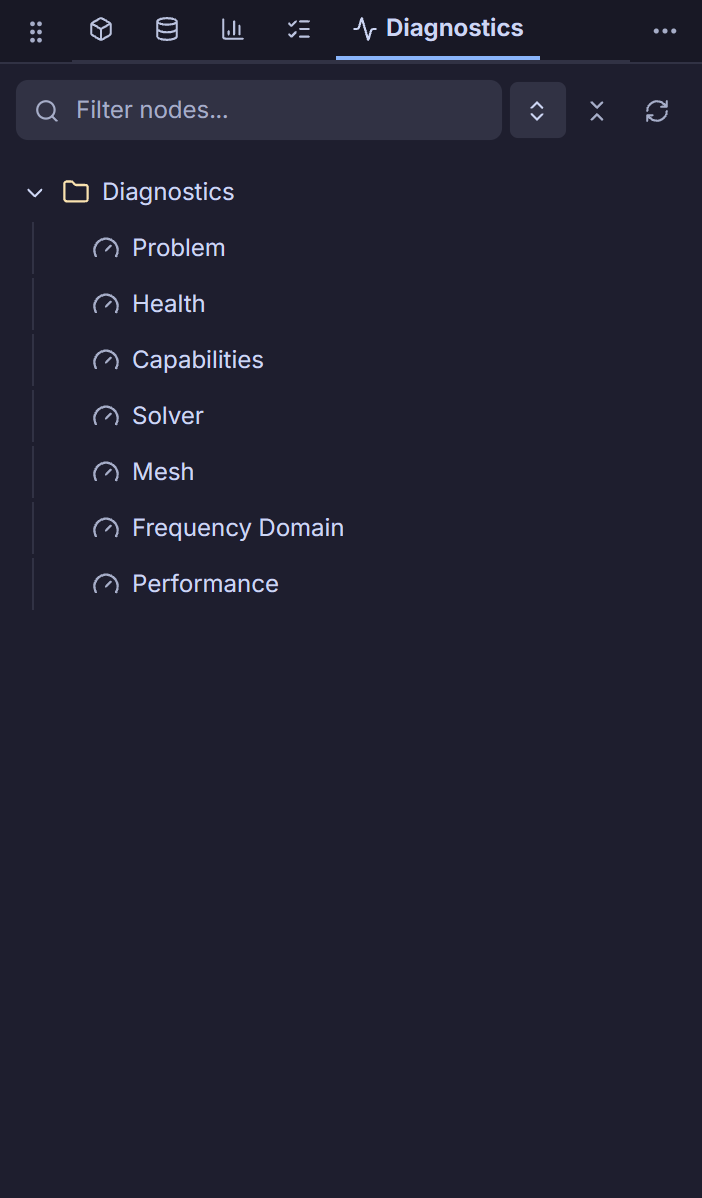
4. Jobs and 5. Diagnostics Tabs
The Jobs and Diagnostics explorer tabs expose active/queued backend commands, FEM mesh build
executions (current vs. latest-successful), solver preparation checks, and session telemetry or
transport health. Selecting entries here opens corresponding dedicated explorer/runtime inspector
frames.
Footer Dock and Status Bar
FooterModule (apps/control-room/src/modules/footer/FooterModule.tsx) hosts seven dockable
operational tabs at the bottom of the workspace:
Logs: Command audit (
CommandAuditTable) and HTTP/WS transport log (TransportLogTable) filterable byAll/RX/TXandHTTP+WS/HTTP/WS/Perf.Telemetry: Overview telemetry plus an auto-switching Antenna sub-tab when an
antenna_field_solvestage runs.Diagnostics:
DiagnosticRecorderFooterPanelfor trace recording and performance export.Engine:
FooterDiagnosticsshowing solver engine metrics and profiler readout.Operations:
OperationsPanelpaired withMeshJobsPanel(published operations and FEM mesh job progress).Problems:
ProblemsPanelaggregating preparation blockers, geometry diagnostics, and failed mesh/command notices.Quick Chart: Embedded
QuickChartResourceViewfor immediate scalar inspection without leaving the main canvas.
StatusBarModule (apps/control-room/src/modules/status-bar/StatusBarModule.tsx) sits beneath
the footer dock and summarizes session lifecycle (clicking opens Telemetry), active session name,
runtime bundle version, mesh status badge (clicking opens Operations),
SimulationPreparationStatusEntry, realtime WebSocket connection state, freshness indicator,
progress readout with conditional Compute action when awaiting compute, and resolved execution
method/device label.

Screenshots illustrate the interface; they are not runtime or physics qualification evidence.
Control Room crosswalk
Navigation:
InstanceTabStrip(/home,/session/<slug>,?port=,/instance/<port>),AppMenuBar, andCommandPaletteModule(Ctrl+Shift+P).Command authoring:
RibbonModulerenders verified commands fromribbonContributions.tsx/ribbonTabViews.tsxafterstripRibbonPlaceholders.Selection routing:
ExplorerModule(Model,Resources,Results,Jobs,Diagnostics) drivesSelectionintoInspectorRegistry, whileFooterModuleandStatusBarModuleremain observational and diagnostic docks.
Python/API crosswalk
Every Ribbon geometry, material, physics, mesh, and stage action commits via OpenAPI v2 session endpoints mirrored in
packages/fullmag-py.File -> Save canonical copy as…exports an equivalent script, whereasautomationtab two-way script diffing remains hidden (TODO: frontend support, gated bypreview: true).
Physics and bibliography scope
This page covers shell navigation, command routing, and resource indexing only; numerical algorithms and micromagnetic equations are documented under the physics and numerical-methods guides.
Source-code index
Responsibility |
Repository path |
Stable symbol |
|---|---|---|
Session & multi-instance tab strip |
|
|
Tab URL parsing and port scoping |
|
|
Menubar, quick actions, dialogs |
|
|
Command Palette overlay |
|
|
Palette manifest & shortcut |
|
|
Ribbon tab definitions & placeholder stripping |
|
|
Workspace & View ribbon definitions |
|
|
Five-tab Semantic Explorer |
|
|
Explorer tab switcher |
|
|
Bottom dock tabs & antenna auto-focus |
|
|
Operations & Mesh Jobs dock panel |
|
|
Bottom telemetry & state bar |
|
|